Copperleaf Build gives contractors everything the big platforms charge a fortune for: scheduling, time, daily logs, receipts, invoicing and a client portal. Unlimited users on every plan, so it costs the same whether you're two people or twenty.
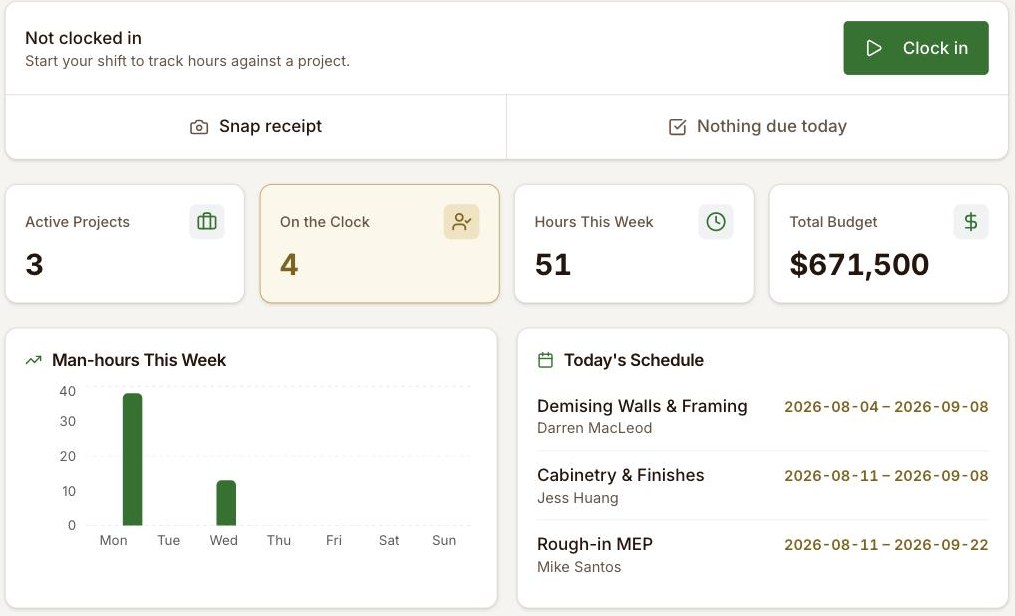
Every feature earns its place by saving your crew real time. Here's what that looks like.
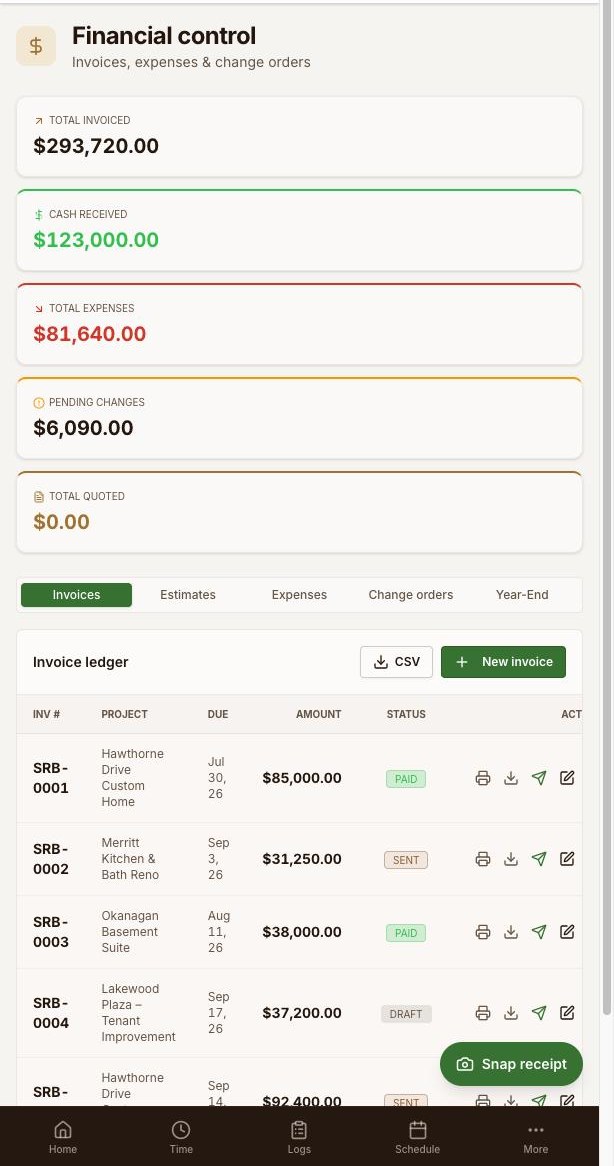
Standing at the lumber yard with a fistful of receipts? Tap Snap receipt in the Finances tab, take a photo, and the app's OCR reads the vendor, total and the tax you paid — and fills the expense out for you.
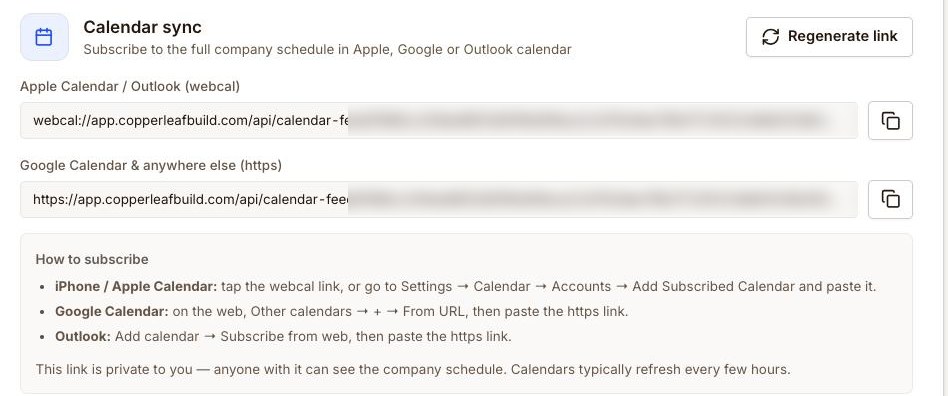
Subscribe your company schedule into Apple Calendar, Google Calendar or Outlook once, and every job and phase shows up alongside the rest of your day — and stays current on its own.
One-way sync — your calendar mirrors Copperleaf Build's schedule so it's always up to date.
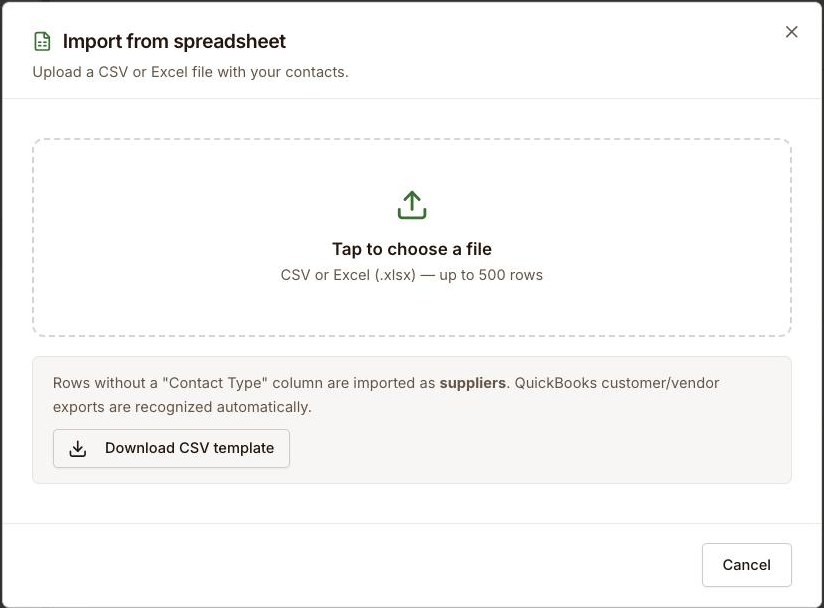
Bring your suppliers, subs and clients with you. Upload a CSV or Excel file and Copperleaf Build imports your whole contact list at once — it even recognizes QuickBooks customer and vendor exports automatically.
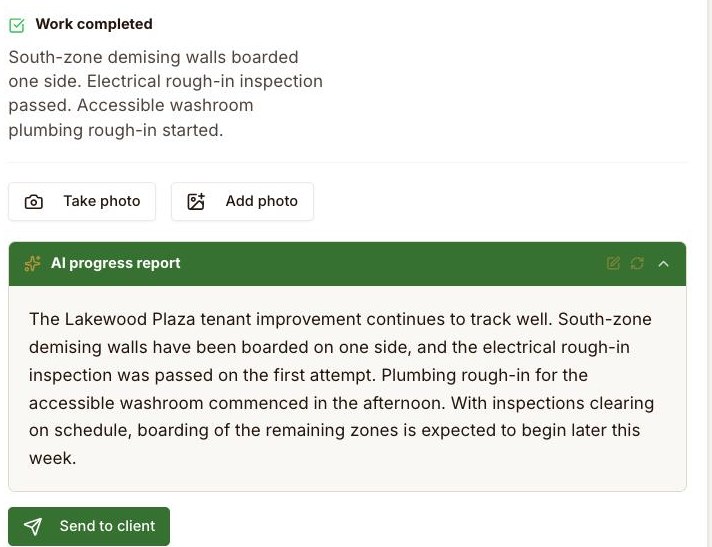
Your crew jots a few quick notes on site. Copperleaf Build turns them into a clear, professional progress update on your branding — and sends it straight to the client's inbox.
Impress clients with a professional, always-on view of their project — while you stay in complete control of what they can and can't see.
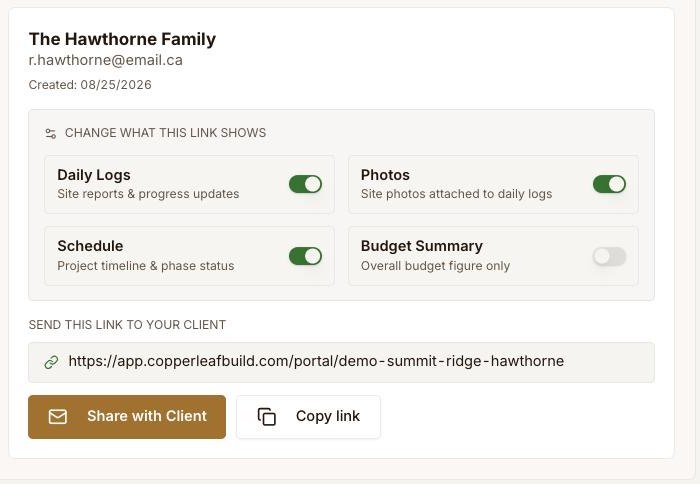
Generate a secure link for each project that your client opens in any browser — no login, no account, nothing to install. Flip on only what you want them to see, and revoke the link any time.
The big platforms bury contractors in per-seat fees, five-figure onboarding and features you'll never touch. Copperleaf Build gives you the tools that matter, priced so your whole company can use them.
Plans start at $39/month with unlimited users — no five-figure onboarding, no per-seat surprises. You pay for the software, not for every person who logs in.
Add your whole crew, your subs, your office help. Everyone gets access. You never pay more for adding another team member — crew or office.
Don't like something? Email us. If it makes sense, we build it, repackage it, and ship it. Moving fast on what customers actually ask for is the whole point — try getting that from the big platforms.
Pro and Business plans include ready-to-use contracts, checklists and proposals built by a contractor with 30 years on the tools — bundled right into the app.
Year-end contractor tax slips, the right sales tax for your province or state, and privacy practices that meet the law where you operate — handled out of the box, not a US tool retrofitted for everywhere else. See how it works on both sides of the border →
Jump into a fully loaded sample company and try everything. No signup, no username, no password.
Pick the sample company closest to your trade and explore the real product — add, edit and click anything. It's a shared demo that refreshes daily, so poke around freely.
Real screens, real features — nothing here is a mock-up.
Real screens, real narration, no filler — recorded in the actual app. Start at the top if you're new, or jump straight to the one you need.
Six fields, and the job is live with its own number.
A name and a rate. Extra users never cost you more.
Hours land on the right job without anyone doing paperwork.
A spreadsheet or a QuickBooks export, in about a minute.
Rough notes in, a report you can send the client back out.
Photograph it and let the expense fill itself in.
Your cost and your markup stay yours. The client sees one column.
The argument you don't want to be having in month five.
The client portal — a secure link, no login for them.
The two numbers your accountant asks for at year end — a drive logbook that keeps commute separate, and total hours by person and by job.
Each one has proper captions, not auto-generated ones. The badge shows which plan the feature is on.

My own company runs on it. My crew clocks in on Copperleaf Build, the daily logs my clients get come out of it, and so do my estimates and invoices. I use it on my jobs every day — if it can run my company, it can run yours.
I'm a licensed builder with 30 years on the tools, and I built Copperleaf Build because the software out there was either priced for the biggest companies in the industry, or too stripped-down and clunky to run a real business on.
So I built the one I wanted: powerful enough to run every job, priced so the whole team can use it, and quick enough to learn that nobody on the crew fights it. If something's missing or in your way, email me — if it makes sense, we build it. That's a promise you won't get from the big platforms.
Everything the big platforms do for daily job management — without per-seat fees or enterprise pricing.
The bigger your team, the more per-seat pricing costs you — and the more unlimited users saves you.
*Buildertrend's entry plan starts around US$399/month and ranges up to roughly $1,099/month, as of June 2026. Copperleaf Build starts at $39 CAD/month — with unlimited users on every plan.
Same features and unlimited users on every plan — whether you're a one-person shop or running several crews. Pay monthly, or save a month by paying annually.
The essentials to run the crew and the schedule.
For contractors winning work and getting paid.
For contractors running the books — mileage, year-end and QuickBooks.
Free for 14 days. No credit card. Every feature unlocked while you try it — decide once you know whether it works on your jobs. Cancel anytime. Prices in CAD; applicable taxes extra.
Each plan includes generous file storage for your photos and documents (25 / 100 / 250 GB). Most contractors never come close. If you need more, it's just $0.25/GB per month — and we'll email you well before you reach your limit, so there are never surprise charges. Videos count toward your storage like any other file.
| Feature | Starter | Pro | Business |
|---|---|---|---|
| Unlimited users | ✓ | ✓ | ✓ |
| Projects & tasks | ✓ | ✓ | ✓ |
| Scheduling | ✓ | ✓ | ✓ |
| Time tracking — clock in/out, breaks, timesheets | ✓ | ✓ | ✓ |
| Daily logs with AI-written reports | ✓ | ✓ | ✓ |
| Crew & directory | ✓ | ✓ | ✓ |
| Calendar sync (one-way) | ✓ | ✓ | ✓ |
| CSV / Excel import | ✓ | ✓ | ✓ |
| Snap receipt — photograph an expense | — | ✓ | ✓ |
| Estimates & invoicing | — | ✓ | ✓ |
| Change orders | — | ✓ | ✓ |
| Client portal | — | ✓ | ✓ |
| Subtrades & suppliers | — | ✓ | ✓ |
| Resource template library | — | ✓ | ✓ |
| Mileage & drive logbook | — | — | ✓ |
| Year-end tax report | — | — | ✓ |
| Man-hours reporting | — | — | ✓ |
| Push invoices to QuickBooks | — | — | ✓ |
| Multiple admins | — | — | ✓ |
| Priority support | — | — | ✓ |
| Included file storage | 25 GB | 100 GB | 250 GB |
Every plan includes unlimited users — the row that never changes, whichever one you pick.
 Secure checkout — your card is processed by Stripe. We never see or store your card details.
The big platforms make you wait years for changes. We're set up to listen: email us what your business needs and, if it makes sense, we build it, repackage it, and ship it. That responsiveness is the whole reason Copperleaf Build exists.
Tell us what you needA question about a plan, something you'd like built, or trouble with your account — write to us here and it comes straight to us. Every message is recorded, so nothing gets lost on the way.
Whether your crews work in Canada or the United States, Copperleaf Build fits the way you do business. Enter company and project addresses for either country, bill with the right region-based sales tax, and know your data is handled under the privacy laws that apply to you.
Correct. Every plan includes unlimited users. Add your full crew, subs and office staff without your bill going up.
Snap receipt is on the Pro plan and up. On the Finances tab, tap Snap receipt and photograph the receipt. The app reads the vendor, total and tax you paid and pre-fills the expense for you — so you can capture costs on site instead of keying them in later. Always give it a quick glance before saving.
It's one-way for now: you subscribe your Copperleaf Build schedule into Apple Calendar, Google Calendar or Outlook and it stays up to date automatically. Changes are made in Copperleaf Build and flow out to your calendar.
Yes — the client portal is on the Pro plan and up. You generate a secure link per job and choose exactly what it shows — daily logs, photos, schedule and/or a budget summary. Your client opens it in any browser, no login required, and you can revoke it any time.
No long-term contract. Pay monthly or annually, and cancel anytime from your billing page. Annual plans get a month free.
Then you have not paid us anything. The 14-day trial needs no credit card and does not roll into a subscription on its own — when it ends, it ends, and your data stays put in case you come back. You only pay when you decide to.
Choose a plan and check out securely with Stripe using any major credit card — your account activates within seconds, no waiting on an invoice. Any applicable sales tax is calculated automatically at checkout based on your billing location. You can update your card, view invoices, or cancel anytime from your billing portal. Stripe processes the payment; we never see or store your card details.
Yes — see the Privacy & Security section below. Your data is encrypted, kept strictly separate from every other company, and you control exactly what each crew member can see.
We know you're trusting us with your jobs, your crew and your customers' information. We take that seriously, and we build the app to keep it safe and private.
Read the details in our Privacy Policy and Terms of Service.
Start your company account today, or click into the live demo first — no signup, no card. Your account starts on a 14-day free trial with every feature unlocked.
 Copperleaf Build